DIY T-shirt Design: Art & AI
- 4.6
- Rating
- 500.00K
- Installs
- Free
- Price
 Analysis by App-foxy
When I want to turn a quick idea into something I can actually wear, I usually begin with a rough sketch, a phrase, or an image in my phone rather than a polished design file. DIY T-shirt Design: Art & AI is aimed at that exact starting point. It is a free art and design app from Neli Creative that puts the focus on making a custom shirt without first learning a full desktop design program.
My first impression is that the app makes the distance between “I have an idea” and “I can show someone a shirt concept” feel pleasantly short. That does not mean every result is automatically ready for professional printing, but it does make experimentation approachable. The app is rated for Everyone, works from Android 9 onward, and its current version is 2.0.13. Those details matter because this is the kind of tool people may open casually on an older phone, during a break, or while planning an event with friends.
From a rough idea to a wearable design
The most useful way to judge this app is to follow a complete project rather than tap through isolated tools. I imagined a realistic situation: I needed a simple shirt concept for a small weekend gathering, had a short slogan in mind, and wanted something more personal than a plain text mock-up. I did not want to spend an evening learning layers, masks, export settings, and a large collection of professional controls.
You May Also Like

 Blood Strike: 2.5 Anniversary
Blood Strike’s Loadouts Turn Every Drop Into a Tactical Gamble
A close look at Blood Strike’s custom loadouts: how fast access to signature weapons reshapes its battle royale rhythm, rewards preparation, and narrows the gap between fights.

 Pandora - Music & Podcasts
Pandora’s Music Is Easy to Start, but Harder to Recover
Pandora’s strength is its low-effort path from a seed to a station. Its weak spot is how much confidence it asks you to place in connection, setup, and quiet recovery.

 8 Ball Pool
8 Ball Pool Is Built on Rivalries, Rematches, and Routine
A close look at the rivalries, rematches, shared routines, and unanswered safety questions that turn a quick pool match into a persistent mobile community.

 Samsung Music
Samsung Music’s Quiet Strength Is Playing What You Already Own
Its reach comes less from spectacle than from dependable access to a personal library. That simplicity is both the app’s strongest retention engine and its ceiling.

 AccuWeather: Weather Radar
AccuWeather Review: A Quick, Clear Forecast for Everyday Decisions
For everyday plans, the best forecast is the one you can understand quickly. AccuWeather makes rain timing, radar, and local conditions easy to act on, with a few trade-offs.

 Hill Climb Racing
Why Hill Climb Racing Still Turns Crashes Into One More Run
A tiny car, a bumpy hill and one more upgrade: Hill Climb Racing keeps resurfacing because its simple chaos makes every near-miss feel personal.
More From Our News Desk



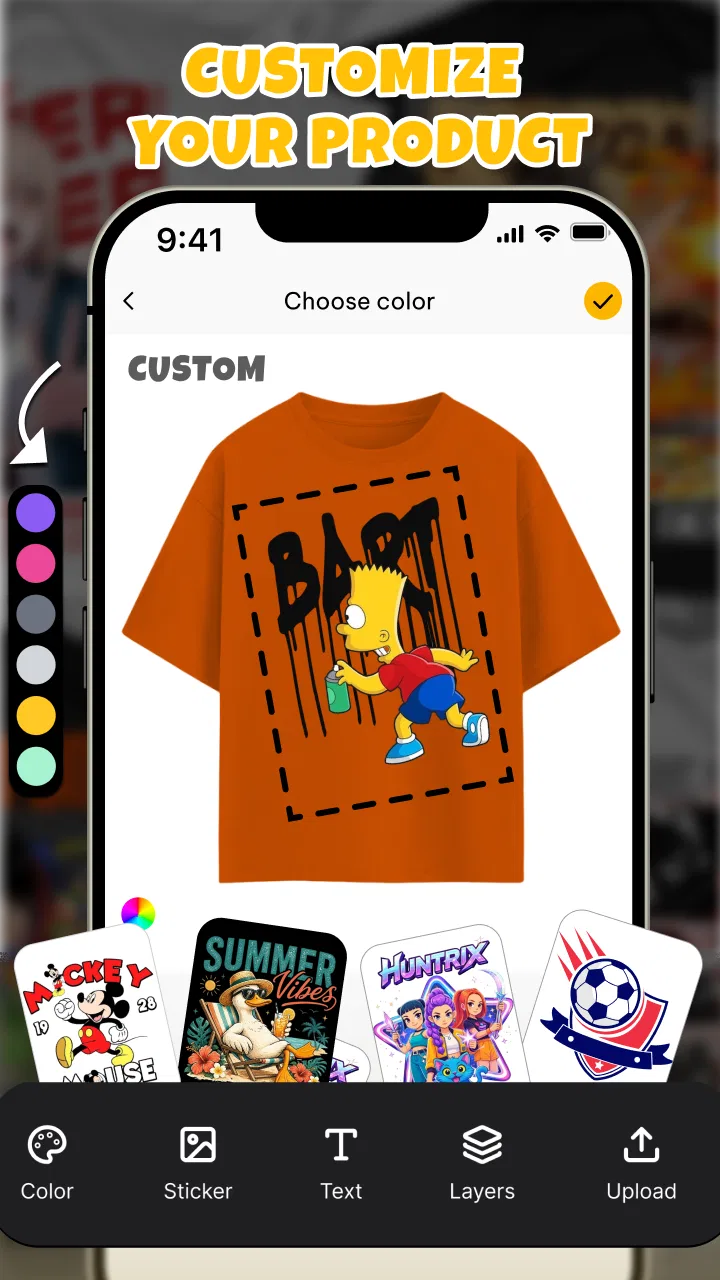
That starting condition is where the app feels strongest. It is designed for people who know the mood they want but may not know how to build the artwork from scratch. A beginner can approach the project as a sequence of choices: decide what the shirt should communicate, create or adapt the visual, adjust the composition, and then prepare the result for the next step. The process is less intimidating than opening a traditional illustration or layout application.
I would describe the app as a practical idea generator and shirt-design workspace rather than a complete replacement for professional graphic software. That distinction is important. If I am making a playful design for myself, a family activity, a club concept, or a one-off gift, the lighter workflow is a benefit. If I need exact brand colors, carefully controlled typography, editable vector artwork, or production specifications for a large order, I would want another tool involved.
The free price makes trying that workflow easy. I can test an idea without committing money before I know whether the concept works. At the same time, “free” should not be confused with a guarantee that every generated design will be suitable for a printer. I still need to inspect the artwork closely, especially around small text, fine details, and the edges of the composition.
Starting with the message, not the decoration
My best results come when I decide the shirt’s purpose before touching the visual style. A short message for a birthday gathering needs a different treatment from a small business emblem or a humorous design intended for a friend. Art & AI is more useful when I bring that decision into the app instead of expecting the app to discover the whole idea for me.
I also recommend writing the wording separately before placing it into the design. This sounds basic, but it prevents a common problem: spending time arranging a visual and only later realizing that the slogan is too long, unclear, or difficult to read at shirt distance. A shirt is viewed while people are moving, so a design that looks attractive when zoomed in may lose its message in everyday use.
A more advanced habit is to prepare two or three versions of the same concept. I might keep one with a bold central image, another with a smaller emblem, and a third with text taking the lead. Comparing variations is more useful than endlessly polishing the first attempt, because the best-looking screen composition is not always the most wearable one.
Building the artwork step by step
The app’s appeal is the way it brings art and AI into the same shirt-focused task. Instead of treating the visual as a separate illustration project, I can think about it in relation to the final garment. That changes how I judge the result. I am not only asking whether the image looks interesting; I am asking whether it has a clear silhouette, enough contrast, and a shape that makes sense on fabric.
When I work through a concept, I keep the first attempt deliberately simple. One strong subject and a readable phrase usually give me a better starting point than a crowded composition. AI-assisted creativity can produce surprising directions, but surprise is not always the same as usefulness. A design may contain attractive details that compete with the central message, so I treat the first output as a draft rather than a finished answer.
This is one of the app’s less obvious strengths: it encourages a faster design loop. I can move from a vague thought to something visible, react to it, and then refine the idea. That is valuable for people who struggle with the blank canvas. The app gives the imagination something concrete to respond to, even when the first version is not the one I would print.
There is also a trade-off. A fast AI-oriented workflow can make it tempting to accept the first appealing result. I get better outcomes when I pause and inspect the design as a shirt, not as a phone image. I check whether the main subject is recognizable at a glance, whether the lettering has enough breathing room, and whether the overall arrangement would still work if the shirt color changed.
The handoff from creation to editing
The important handoff happens when an idea becomes an actual layout. This is where many quick design apps can feel less capable than full editors. I need to take responsibility for balance, spacing, and legibility rather than assuming that a visually pleasing generated image has already solved those problems.
I treat the artwork and the shirt placement as two different decisions. First I judge the image on its own. Then I judge its position, scale, and relationship to the shirt. A graphic that works as a square picture may feel too wide across the chest, while a tall image can become awkward if it is reduced too much. Keeping those questions separate helps me avoid confusing a good illustration with a good T-shirt design.
For text-heavy projects, I would be especially careful. Small lettering, unusual punctuation, and long phrases deserve a close inspection before I consider the project complete. AI-created visual elements can be expressive, but written content still needs human checking. I would never send a design straight to printing without reading every word and checking the composition at a realistic viewing size.
Another useful handoff is between the person designing and the person approving. If I am making a shirt for a group, I would show a few alternatives rather than asking for feedback on one version. That keeps the conversation focused: people can compare a bold option with a quieter one, discuss the message, and identify practical concerns before anyone spends money on production.
What the finished result is good for
For personal projects, the app can turn a passing idea into a convincing visual concept quickly. I can imagine using it for a family shirt, a casual team design, a themed gathering, a humorous present, or an early concept for a small creative project. It is particularly comfortable when the goal is expression rather than strict visual consistency.
The result is also useful before the final purchase or print decision. Even if I eventually move the design into another program, the app can help me settle the direction first. That saves time because I am no longer asking a printer or a more complex editor to invent the concept while also preparing it for production.
Its audience extends beyond people who already think of themselves as designers. Someone who normally relies on templates can use the app to explore a more personal direction. A parent planning a playful shirt can start from an idea instead of searching through generic designs. A small group can use it to agree on a visual identity before deciding how many shirts they actually need.
However, I would not choose it as my only tool for a serious apparel brand. A professional workflow may require precise alignment, repeatable files, color management, editable source elements, and consistent treatment across several products. The app’s value is greater at the concept and casual creation end of the spectrum than in highly controlled production work.
Where the workflow becomes less comfortable
The biggest friction is the gap between creative speed and print certainty. The app can help me make something attractive on a screen, but a screen is forgiving. Bright colors, fine lines, and subtle contrast may look stronger digitally than they do on fabric. Before printing, I would ask the production service what file characteristics it needs and whether the design should be adjusted for the chosen shirt color and printing method.
I also find that AI-assisted creation requires active editing judgment. Generated artwork can include visual clutter, awkward details, or a style that does not quite match the intended audience. That is not a reason to avoid the app; it is a reason to use it as a creative partner rather than an automatic designer. The person holding the phone still needs to decide what belongs in the final composition.
Another limitation is the learning curve hidden inside simplicity. The interface may feel approachable at first, but good results still depend on design basics: contrast, hierarchy, spacing, and restraint. A beginner can create a shirt quickly, yet creating one that looks deliberate may take several attempts. I consider that a fair trade-off, although users expecting one-tap perfection may be disappointed.
For exact logo work, I would skip this app as the primary solution and use a dedicated vector or layout editor instead. For highly detailed artwork, I would prefer an illustration tool that gives me more control over every element. For a quick personalized shirt where the main challenge is getting from an idea to a shareable concept, this app is a much better fit.
How it compares with the usual alternatives
Compared with a traditional graphic editor, Art & AI is easier to approach and more directly connected to the shirt use case. A full editor gives me deeper control, but it also asks me to understand a larger set of tools before I can produce anything useful. I would choose the traditional option when precision matters more than speed.
Compared with a template-based design service, this app feels better suited to starting from an original thought. Templates are convenient when I want a proven layout and quick customization. They can also make group projects faster because the structure is already established. The trade-off is that the result may look familiar or limited by the template’s assumptions.
Compared with a dedicated drawing app, this one keeps the garment outcome in view. A drawing app may be better for hand-made illustration, brush control, and detailed artwork, while this app is more convenient when the destination is a custom T-shirt. I would use both together if I wanted to draw a unique character elsewhere and then develop the shirt concept around it.
The practical choice depends on the handoff. If I am still searching for an idea, this app is useful. If I already have a finished, technically prepared design, another tool or a printer’s workflow may be more appropriate. Understanding that boundary prevents frustration and helps me use the app where it provides the most value.
Who should try it, and who should pass
I would recommend it to first-time shirt designers, casual creators, families planning matching clothing, and anyone who wants to explore a visual idea without opening complex desktop software. It is also a sensible option for someone who wants to compare several directions before asking another person to handle final production.
I would be more cautious if my project depends on exact brand guidelines, professional prepress control, or a large collection of coordinated designs. In those situations, the app may still help with brainstorming, but I would not rely on it alone. The more expensive or important the printing job, the more valuable a controlled finishing stage becomes.
The app’s broad reach suggests that this approachable workflow is resonating with many users: it has passed half a million installs and holds a 4.6 average from around 1.6 thousand ratings. Those figures do not replace personal testing, but they fit my impression that the app is built for accessible, hands-on experimentation rather than a narrow professional audience.
My final take after following the whole process
What I like most is the way Art & AI reduces the intimidating first step. I can begin with a rough idea, explore a visual direction, and reach a shirt concept without needing to master a large design suite. The strongest results come when I use that speed thoughtfully: keep the message short, compare variations, inspect text carefully, and judge the artwork at the size and contrast it will have on fabric.
What I would not do is treat the first attractive result as production-ready. The final handoff still belongs to me, and possibly to a printer or a more precise editor. Checking readability, spacing, color contrast, and technical requirements is part of making a successful shirt, not an optional extra.
Overall, I see this free app from Neli Creative as a friendly starting point for custom apparel ideas. Its Everyone rating makes it suitable for a broad audience, and the current 2.0.13 release gives users a clear version to identify when troubleshooting or comparing experiences. I would install it when I need a quick, personal design path; I would switch tools when the project demands exacting control.
My recommendation is simple: use it to get from “I have an idea” to “I can see the shirt,” then give the result a careful human review before printing. For casual, creative, and personalized projects, that is a useful balance of speed and freedom. For professional apparel production, it works best as the beginning of the workflow rather than the entire workflow.
FAQs for DIY T-shirt Design: Art & AI
01What is DIY T-shirt Design: Art & AI?
DIY T-shirt Design: Art & AI is a mobile design app for creating custom shirt artwork with drawing tools, templates, text options, stickers, and AI-assisted ideas. It is intended for users who want to make personalized designs without advanced graphic-design experience. You can experiment with layouts, colors, typography, and visual effects before saving or sharing the finished concept.
02Do I need design experience to use DIY T-shirt Design: Art & AI?
No. The app is designed for beginners as well as more experienced creators. Its templates and guided editing tools make it possible to start with a ready-made idea and modify it, while users who prefer more control can build a design from a blank canvas. Some trial and error may still be needed to achieve accurate placement, readable text, and a print-ready result.
03Does the app use artificial intelligence to create T-shirt designs?
Yes, AI features can help generate or develop design ideas from written prompts, depending on the version and features available on your device. Results may vary, so generated artwork often benefits from manual editing afterward. Before using an AI-created image commercially, check its licensing conditions and make sure the final design does not contain copyrighted characters, logos, or other protected material.
04Can I print or order a T-shirt directly from the app?
The app is primarily focused on creating and editing artwork, so direct printing or shirt ordering may depend on the available version, region, and connected services. In many cases, you can save or export the finished design and then upload it to a separate printing provider. Check the export options, image quality, background settings, and file format before sending artwork to print.
05Is DIY T-shirt Design: Art & AI free to download and use?
The application may be free to install while offering optional purchases, premium tools, subscription features, advertisements, or limits on certain AI generations and export options. The exact conditions can change between Android and iOS and may also vary by country. Review the store listing and in-app purchase details before downloading, especially if you need unrestricted tools or high-resolution exports.
Pros
- AI tools quickly turn ideas into original T-shirt artwork.
- Includes templates that help beginners start designing faster.
- Useful text and typography options for personalized shirt designs.
- Simple editing interface makes experimenting easy on mobile.
- Suitable for creating designs for gifts
- events
- or small projects.
Cons
- Some advanced design tools may require a subscription or paid credits.
- AI-generated artwork can contain odd details or imperfect lettering.
- Export quality may vary depending on the selected plan or format.
- The app may show frequent ads during free use.
- Commercial printing rights should be checked before selling your designs.

DIY T-shirt Design: Art & AI
Gallery